2 Step Method for Deep Penetration Calculations

I am doing a fixed source simulation of a fusion device and trying to calculate the expected nuclear heating and fast flux in the magnet region. The magnets have a considerable amount of shielding on them so it is difficult to get many particles (especially E > 0.1 MeV) to the magnet region for good statistics.

I’ve tried using weight windows as a variance reduction method but have not had much success in improving my statistics without drastically increasing my runtime. I think part of the issue is that my source region is quite long (~40 m), so increasing the number of particles only over the entire plasma is not very effective at getting more particles into the magnet region. I have seen greatly improved statistics and similar heating results when simply shrinking the length of my source region (~5 m), but then my model is not accurate to the device I am trying to analyze.

I have tried to implement a 2-step method, where there is an initial simulation ran with the normal source, and a mesh-based flux tally is set up around the magnet shield region to track the number of particles just outside the shield. Then that flux tally is used to create neutron and photon sources in the same region which is very close to the magnet shield and magnet; this should improve statistics in the magnet region quite a bit while reducing the required computation. I’ve included a diagram below: (blue = magnet shield, orange = magnet, red = mesh for flux tally and second step source).

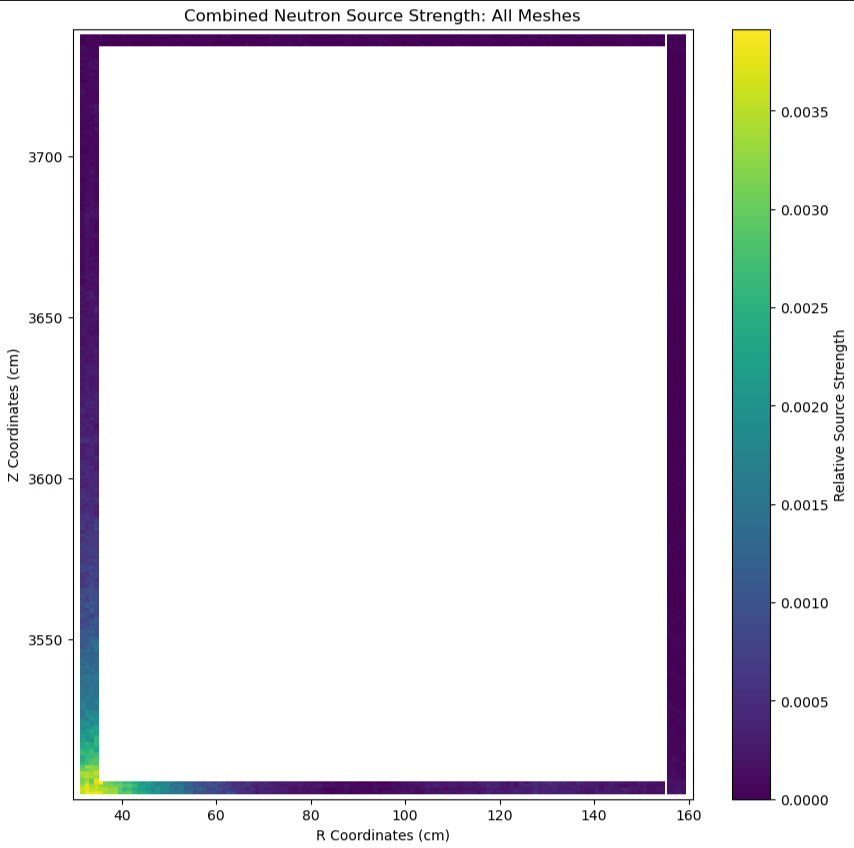
I’m trying to wrap my head around how best to implement this, and wondering if it is even feasible. I have taken my flux tally and converted it into a mesh source as seen below; these sources look about right considering the location of the original source. My results with the second step have been inconsistent with the original model so far (overpredicting heating in the magnet while underpredicting heating in the shield).
I would appreciate any advice or guidance in tackling this issue. Thanks.

Edit: I just found this recent publication which used a similar methodology for this type of calculation.

Fletcher, J. W., Peterson, E. E., Trelewicz, J. R., & Snead, L. L. (2025). Design and Performance of Metal Hydride Composite Neutron Shields for Compact, High-Power Fusion Reactors. Fusion Science and Technology, 1–16. https://doi.org/10.1080/15361055.2025.2514910

It appears the 2-step method was only used to qualitatively assess different shield materials since this method is prone to bias.
You should use a surface source write and read, rather than a tally to create your 2nd step sources.
In the SSW you zero the region of interest (beyond the the SSW surfaces).
In the SSR you leave all geometry in place (restore the region of interest)

This is a very effective way to accelerate computation.

A weight window generator and use of, should not be too affected by the source length.
The weight windows will matter most over the shielding area and allowing the particles to continue without being rouletted.

If you are not using weight windows, make sure you are using survival biasing.

It may be worth revisiting the weight window solution for this problem. My understanding is that weight windows are typically created on a mesh covering the entire simulation domain. My domain is relatively large compared to the region of interest, so applying weight windows over the entire simulation can be expensive.

Would it be better to generate weight windows in a mesh that only covers the magnet and shield region, or to do a full domain mesh with a low resolution?

The implementation of weight windows in OpenMC is generally a bit confusing to me, so I would appreciate any examples which demonstrate how to use them. I am aware of the fusion energy neutronics workshop repository by Jon Shimwell (GitHub - fusion-energy/neutronics-workshop: A workshop covering a range of fusion relevant analysis and simulations with OpenMC, DAGMC, Paramak and other open source fusion neutronics tools).

For FW-CADIS you are going to want the mesh over the whole geometry.

Applying the weight window mesh over the whole simulation is only expensive in terms of RAM/memory, and in that case only if the mesh is super fine.

OpenMC RandomRay generation of weight windows it still in its infancy.
I have had a lot of issues with it, it is rapidly changing and being improved, so I’m holding off on it for now.

I use Advantg to generate my weight windows and then convert them to OpenMC.

You could just have a mesh just over the region of interest, but you’d probably have to generate that manually which is a huge pain.
You might have an SSW/SSR just before the ROI and then WWs compelling the neutrons into the magnets.

The Magic method might work a bit better for you at this stage, it’s probably pretty apt for a magnet situation.

Importances could also be easily used here, but OpenMC doesn’t support them. They are a less abstract and easier to grasp than WW.

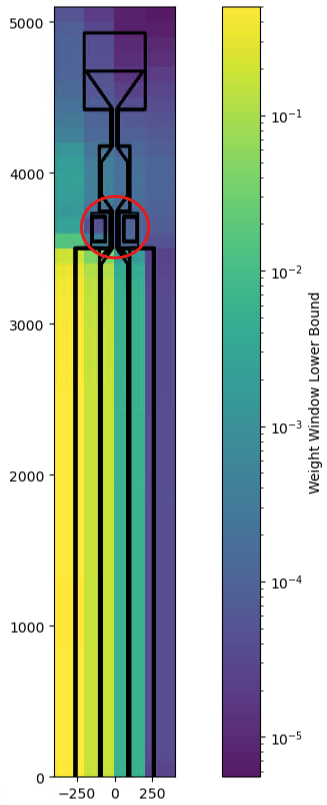
I’m using the magic method by creating a rough mesh over the entire model. This same mesh is used to tally flux and for the weight window generator. Plotting the lower and upper bounds of the weight windows seems to indicate more importance placed in the central region where most of the neutrons come from. It is also asymmetric for some reason, as seen in the image.

I ran the simulation with 1e5 particles for 20 batches but am still getting this strange distribution in my weight windows. As I understand it, the weight windows should take the results of the flux tally over the whole simulation and give greater importance to regions where there is higher error or standard deviation in the flux (like in the magnet region circled in red). However, the weight window generator does not appear to be doing that.

Any advice on how to get weight windows that prioritize the magnet region? I suppose I could try manually assigning the bounds of each weight window instead of using the magic method.

The weight window is going in the right direction.
“Importance” is inverted in weight windows. So lower bounds means it is driving the neutrons towards that region

To truly target the magnet region directly, you would be best to use CADIS which is not yet implemented in OpenMC.
MCNP+Advantg

However, FW-CADIS and Magic should also be able to accomplish this.

The Weight Window Bible
https://mcnp.lanl.gov/pdf_files/TechReport_1985_LANL_LA-10363-MS_Booth.pdf

Thanks for the recommendation. After a bit more investigation, I’ve realized the asymmetry issue was due to the way the cylindrical mesh is being plotted. When I switched to a regular mesh, the distribution of lower and upper bounds is symmetric about the center of my model as seen below (top plot is cylindrical mesh, bottom plot is regular mesh)

I’m not sure if this is an actual issue with the weight window generator on cylindrical meshes or just an error in plotting on my part. Regardless, I’m going with regular meshes in the future.