# OpenMC Installation Windows 10 with Docker..... Stuck at Codespace
**URL:** https://openmc.discourse.group/t/openmc-installation-windows-10-with-docker-stuck-at-codespace/2858
**Category:** User Support
**Created:** [March 24, 2023, 8:32am UTC](https://openmc.discourse.group/t/openmc-installation-windows-10-with-docker-stuck-at-codespace/2858 "2023-03-24T08:32:23Z")
**Posts on this page:** 20
**Page:** 1
### Author:  [@Nilormi](https://openmc.discourse.group/u/Nilormi)
#### Post date: [March 24, 2023, 8:32am UTC](https://openmc.discourse.group/t/openmc-installation-windows-10-with-docker-stuck-at-codespace/2858/1 "2023-03-24T08:32:23Z")
It has been 2 days I have performed the step 4 under Local Installation as mentioned in [GitHub - fusion-energy/neutronics-workshop: A workshop covering a range of fusion relevant analysis and simulations with OpenMC, DAGMC, Paramak and other open source fusion neutronics tools](https://github.com/fusion-energy/neutronics-workshop). It is still showing some stuffs extracting and downloading and the following appeared:

I would also like to know that whether do I need to follow all these steps everytime I use OpenMC?
---
### Author:  [@Shimwell](https://openmc.discourse.group/u/Shimwell)
#### Post date: [March 24, 2023, 10:13pm UTC](https://openmc.discourse.group/t/openmc-installation-windows-10-with-docker-stuck-at-codespace/2858/2 "2023-03-24T22:13:31Z")
When using a prebuilt docker image containing openmc you tend to download the image once with a `docker pull` command. Then it is saved to your computer. The image can then be run with a `docker run` command.
In the neutronics workshop image the url displayed in the terminal can be loaded up with a browser and you should be presented with a jupyter notebook.
The neutronics-workshop is just one image but there are other images that have openmc installed such as these ones
[https://hub.docker.com/r/openmc/openmc/tags](https://hub.docker.com/r/openmc/openmc/tags)
---
### Author:  [@Nilormi](https://openmc.discourse.group/u/Nilormi)
#### Post date: [March 27, 2023, 1:24pm UTC](https://openmc.discourse.group/t/openmc-installation-windows-10-with-docker-stuck-at-codespace/2858/3 "2023-03-27T13:24:46Z")
after pulling the latest docker image using docker pull openmc/openmc:latest, how do I run it?
docker run openmc/openmc:latest returned error.
---
### Author:  [@Shimwell](https://openmc.discourse.group/u/Shimwell)
#### Post date: [March 27, 2023, 2:39pm UTC](https://openmc.discourse.group/t/openmc-installation-windows-10-with-docker-stuck-at-codespace/2858/4 "2023-03-27T14:39:36Z")
Without seeing the error I can only guess that the command is missing something.
Perhaps try including `-it` in the command like this
```auto
docker run -it openmc/openmc:latest
```
---
### Author:  [@Nilormi](https://openmc.discourse.group/u/Nilormi)
#### Post date: [March 27, 2023, 3:00pm UTC](https://openmc.discourse.group/t/openmc-installation-windows-10-with-docker-stuck-at-codespace/2858/5 "2023-03-27T15:00:06Z")
> [@Shimwell](#):
>
> `docker run -it openmc/openmc:latest`
This is returning root@c0dad529ee9d:/# I tried to google on what shall I type to proceed further but it resulted nothing.
---
### Author:  [@Shimwell](https://openmc.discourse.group/u/Shimwell)
#### Post date: [March 27, 2023, 3:01pm UTC](https://openmc.discourse.group/t/openmc-installation-windows-10-with-docker-stuck-at-codespace/2858/6 "2023-03-27T15:01:59Z")
That sounds like the command has loaded up the docker environment. You should find openmc is installed in this new terminal. You can test that by typing openmc
---
### Author:  [@Nilormi](https://openmc.discourse.group/u/Nilormi)
#### Post date: [March 27, 2023, 3:08pm UTC](https://openmc.discourse.group/t/openmc-installation-windows-10-with-docker-stuck-at-codespace/2858/7 "2023-03-27T15:08:57Z")
This is what I receive:
PS C:\WINDOWS\system32\> docker run openmc/openmc
PS C:\WINDOWS\system32\> docker run -it openmc/openmc:latest
root@c0dad529ee9d:/# openmc
ERROR: Settings XML file ‘settings.xml’ does not exist! In order to run OpenMC,
you first need a set of input files; at a minimum, this includes
settings.xml, geometry.xml, and materials.xml. Please consult the user’s
guide at [https://docs.openmc.org](https://docs.openmc.org) for further information.
application called MPI\_Abort(MPI\_COMM\_WORLD, -1) - process 0
[unset]: write\_line error; fd=-1 buf=:cmd=abort exitcode=-1
:
system msg for write\_line failure : Bad file descriptor
root@c0dad529ee9d:/#
---
### Author:  [@Shimwell](https://openmc.discourse.group/u/Shimwell)
#### Post date: [March 27, 2023, 3:11pm UTC](https://openmc.discourse.group/t/openmc-installation-windows-10-with-docker-stuck-at-codespace/2858/8 "2023-03-27T15:11:42Z")
This is the error message from openmc saying it needs input xml files to work.
Congratulations you now have OpenMC installed and accessible in the Docker environment.
---
### Author:  [@Nilormi](https://openmc.discourse.group/u/Nilormi)
#### Post date: [March 27, 2023, 3:14pm UTC](https://openmc.discourse.group/t/openmc-installation-windows-10-with-docker-stuck-at-codespace/2858/9 "2023-03-27T15:14:54Z")
Thank you. That is great. But how do I access it now?
---
### Author:  [@Shimwell](https://openmc.discourse.group/u/Shimwell)
#### Post date: [March 27, 2023, 3:21pm UTC](https://openmc.discourse.group/t/openmc-installation-windows-10-with-docker-stuck-at-codespace/2858/10 "2023-03-27T15:21:31Z")
Now you have the software environment to run openmc the next step would be to make some openmc scripts and run them.
From within the docker file you can also run python scripts, including python scripts that have openmc models. Perhaps this section of the docs is useful
[4. Basics of Using OpenMC — OpenMC Documentation](https://docs.openmc.org/en/stable/usersguide/basics.html)
---
### Author:  [@Nilormi](https://openmc.discourse.group/u/Nilormi)
#### Post date: [March 28, 2023, 12:07pm UTC](https://openmc.discourse.group/t/openmc-installation-windows-10-with-docker-stuck-at-codespace/2858/11 "2023-03-28T12:07:05Z")

This is where I am now. How do I proceed to the python script or the Jupyter Notebook?
---
### Author:  [@Shimwell](https://openmc.discourse.group/u/Shimwell)
#### Post date: [March 28, 2023, 1:13pm UTC](https://openmc.discourse.group/t/openmc-installation-windows-10-with-docker-stuck-at-codespace/2858/12 "2023-03-28T13:13:12Z")
The openmc/openmc:latest docker image doesn’t have jupyter notebooks so if you wanted that you would need to modify the dockerfile and rebuild it. The neutronics-workshop images do have jupyter install and there are video tutorials for launching that on the [github page](https://github.com/fusion-energy/neutronics-workshop#local-installation)
To launch python in the openmc/openmc:latest docker image I would click on the Terminal button, that will get you to the terminal of the docker image.
Once at the terminal you can type `python` followed by the name of your python script. There are some example scripts in the examples folder so if you want to run a random example then you could type `python /root/OpenMC/openmc/examples/jezebel/jezebel.py`
---
### Author:  [@Nilormi](https://openmc.discourse.group/u/Nilormi)
#### Post date: [March 28, 2023, 1:30pm UTC](https://openmc.discourse.group/t/openmc-installation-windows-10-with-docker-stuck-at-codespace/2858/13 "2023-03-28T13:30:19Z")
@Shimwell Thank you very much. You are a true saviour. It did work. But previously also and now too when I try to write a python script in the terminal of the Docker, it does not work.
For example if I want to create a simple geometry of a sphere I start with the import openmc command, it returns an error.
---
### Author:  [@Shimwell](https://openmc.discourse.group/u/Shimwell)
#### Post date: [March 28, 2023, 1:45pm UTC](https://openmc.discourse.group/t/openmc-installation-windows-10-with-docker-stuck-at-codespace/2858/14 "2023-03-28T13:45:54Z")
I think that is a third way of running things using the python in interactive mode.
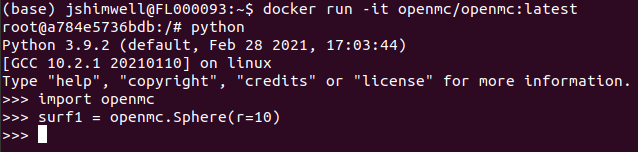
This is different to running a script as you would have to enter each line one at a time. This might be ok for a few lines but running a script will be easier for a bigger number of lines.
It is worth looking carefully at the start of the terminal line to know if you are inside the docker bash shell `#` or an interactive python shell `>>>`
---
### Author:  [@Nilormi](https://openmc.discourse.group/u/Nilormi)
#### Post date: [March 28, 2023, 1:54pm UTC](https://openmc.discourse.group/t/openmc-installation-windows-10-with-docker-stuck-at-codespace/2858/15 "2023-03-28T13:54:45Z")
Did you run this inside Windows Power Shell?
---
### Author:  [@Nilormi](https://openmc.discourse.group/u/Nilormi)
#### Post date: [March 28, 2023, 2:08pm UTC](https://openmc.discourse.group/t/openmc-installation-windows-10-with-docker-stuck-at-codespace/2858/16 "2023-03-28T14:08:42Z")
import openmc
import matplotlib.pyplot as plt
surf1 = openmc.Sphere(r=10)
reg= +surf1
cell= openmc.Cell(region=reg)
univ = openmc.Universe(cells=[cell])
plt.show(univ.plot(width=(1200, 1200), basis=‘xy’, colors=color\_assignment))
upon writing the above code I received this below error:
Traceback (most recent call last):
File “”, line 1, in
File “/usr/local/lib/python3.9/dist-packages/matplotlib/pyplot.py”, line 411, in show
return \_get\_backend\_mod().show(\*args, \*\*kwargs)
TypeError: show() takes 1 positional argument but 2 were given
---
### Author:  [@Shimwell](https://openmc.discourse.group/u/Shimwell)
#### Post date: [March 28, 2023, 11:35pm UTC](https://openmc.discourse.group/t/openmc-installation-windows-10-with-docker-stuck-at-codespace/2858/17 "2023-03-28T23:35:25Z")
I’m running docker from ubuntu terminal, but once you are inside a docker image the location shouldn’t make much different to the user where it was run from.
---
### Author:  [@Shimwell](https://openmc.discourse.group/u/Shimwell)
#### Post date: [March 28, 2023, 11:40pm UTC](https://openmc.discourse.group/t/openmc-installation-windows-10-with-docker-stuck-at-codespace/2858/18 "2023-03-28T23:40:08Z")
looks like univ.plot returns a matplotlib axis so you could try this
```python
import openmc
import matplotlib.pyplot as plt
surf1 = openmc.Sphere(r=10)
reg= +surf1
cell= openmc.Cell(region=reg)
univ = openmc.Universe(cells=[cell])
f=univ.plot(width=(1200, 1200), basis="xy")
f.figure.show()
```
However docker run in interactive mode (-it) might not work with graphics such as showing the plot. So you might want have to run in [WSL with graphics](https://learn.microsoft.com/en-us/windows/wsl/tutorials/gui-apps) or docker with jupyter notebook enabled (like the neutronics-workshop docker image) or save the plot as a file and transfer it from docker to your regular OS using docker [volumes](https://docs.docker.com/storage/volumes/).
---
### Author:  [@Nilormi](https://openmc.discourse.group/u/Nilormi)
#### Post date: [March 29, 2023, 12:29pm UTC](https://openmc.discourse.group/t/openmc-installation-windows-10-with-docker-stuck-at-codespace/2858/19 "2023-03-29T12:29:15Z")
Unfortunately this did not result any output when I typed the mentioned code in Windows Powershell.
Alternatively, I have installed WSL on my another system. I have installed Ubuntu 22.04 within it followed by installing VS code in the WSL environment and python extension within it. I did also install Anaconda within the linux subsystem. Then I followed the process of OpenMC installation in Linux . But now when I am trying to run a python script , there’s a message appearing saying that it cannot find python modules like matplotlib.pyplot. I am unable to figure out the issue.
---
### Author:  [@Shimwell](https://openmc.discourse.group/u/Shimwell)
#### Post date: [March 29, 2023, 1:37pm UTC](https://openmc.discourse.group/t/openmc-installation-windows-10-with-docker-stuck-at-codespace/2858/20 "2023-03-29T13:37:56Z")
the code block above is python so it would need to be typed into a python terminal or run as a python script, it is not intended to be directly typed into power shell.
matplotlib is installed when openmc is installed automatically so I’m not sure how this would have not been installed if openmc was installed.
Perhaps pop by the monthly meet up tomorrow and I’m sure we can get something working for you
[Next page](https://openmc.discourse.group/t/openmc-installation-windows-10-with-docker-stuck-at-codespace/2858.md?page=2)